Prevent double bookings
Conflict checks and clear availability keep operations calm at peak times.
Add-ons · Launch
Let customers and staff book rooms, resources, and appointments on a shared calendar connected to CRM.
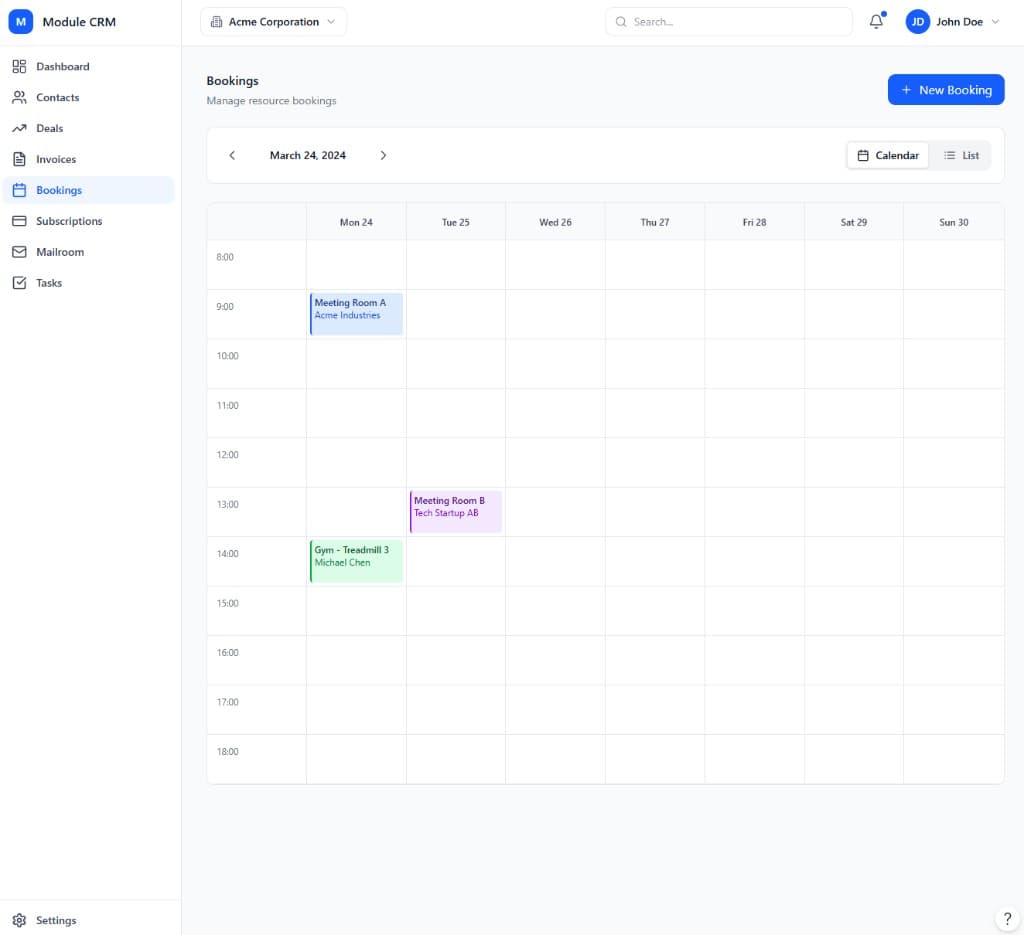
The Booking module gives any team with rooms, resources, or appointment slots a shared calendar that everyone — staff and customers alike — can trust. Day, week, and month views show exactly what is available, and every booking is automatically checked against existing reservations so double-bookings simply cannot happen. Because bookings are tied to CRM contacts, a client who books a meeting room or a consultation shows up on the same customer timeline as their emails, deals, and invoices.
For customer-facing use, the self-service booking portal lets clients or members reserve a slot themselves without a phone call or back-and-forth email. Confirmations and reminders go out automatically by email, cutting down no-shows, while cancellation and reschedule rules keep the calendar honest when plans change. Internally, staff get the same calendar view so nobody double-books a room by accident.
As booking needs get more complex — recurring class series, waitlists when a slot is full, deposits collected at the time of booking, or multiple locations with their own calendars — the Growth tier adds that depth. Enterprise-tier accounts get dynamic pricing, resource optimization, white-label booking portals, and AI-assisted slot suggestions for operators running booking at scale across many rooms or locations.
Because every booking sits on the same calendar staff already look at, there is no separate system to check before confirming a client on the phone or at the front desk. Cancellations and reschedules update availability instantly, so the next person browsing the self-service portal always sees an accurate picture rather than a slot that was actually taken minutes ago.
Teams choose Booking to give clients and members a live calendar to reserve, while staff avoid double-bookings and manual scheduling.
Conflict checks and clear availability keep operations calm at peak times.
Members and clients book online with confirmations and reminders by email or SMS.
Connect bookings to contacts and invoices so paid usage is never lost in a spreadsheet.
None of this requires enabling any other module first. Booking is priced and tiered on its own, so a team can adopt it purely for what it does, and connect it to the rest of ModulCRM only when — and if — that becomes useful.
A typical path from setup to day-to-day use of the Booking module.
01
Add the rooms, desks, or appointment types you offer, along with their availability windows and capacity.
02
Give clients or members a self-service link to see live availability and reserve a slot without contacting staff.
03
Confirmations go out the moment a booking is made, with reminders ahead of time to reduce no-shows.
04
Every booking links back to a CRM contact, and can flow into an invoice or subscription entitlement automatically.
Booking is used differently depending on the size and shape of the team running it, but these are the situations where it comes up most often.
Each module is available in Basic, Growth, and Enterprise — so you pay for depth only where you need it.
Basic covers the core booking workflow end to end, so a small team can run on it indefinitely without ever touching a higher tier. Growth adds the automation, multi-location, and reporting depth that matters once that workflow starts to strain under more volume or more locations.
Enterprise is aimed at organizations that need booking to behave like core infrastructure — with governance, advanced integrations, and, in several modules, AI-assisted features layered on top of everything included at Growth.
Basic
Core essentials
Growth
Scale & automate
Enterprise
Governance & depth
Common questions about the Booking module.
ModulCRM works best when modules share the same contacts and accounts.
Join the waitlist for ModulCRM updates and early pricing.