Plan catalog that scales
Define price, billing cycle, trials, and seat-based options without rebuilding your stack.
Add-ons · Launch
Sell plans with trials, renewals, and upgrades — and keep MRR, churn, and entitlements visible in CRM.
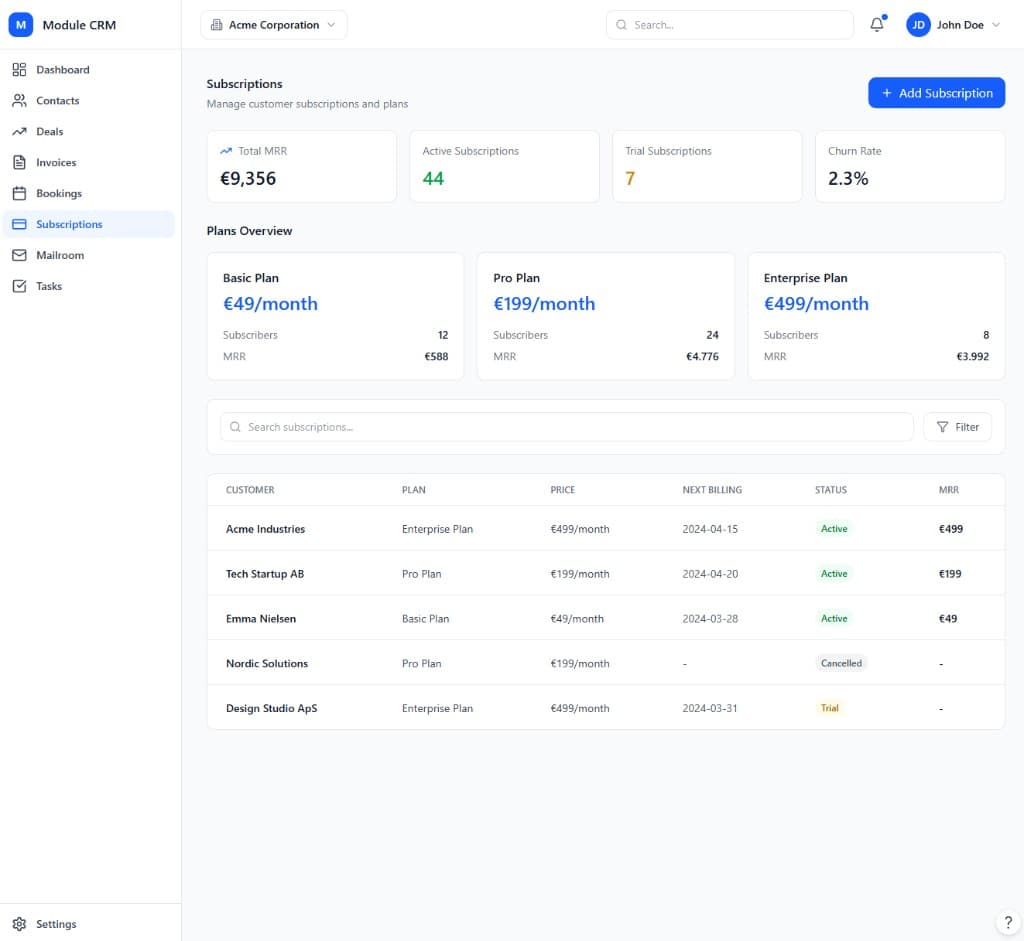
The Subscriptions module handles any recurring relationship your business sells — memberships, plans, or retainers — starting from a simple plan catalog that defines price, billing cycle, and trial length. When a customer subscribes, that plan status lives on their CRM contact record, so sales, support, and billing all see the same up-to-date picture instead of checking a separate billing dashboard.
Day-to-day subscription management covers starting, pausing, and stopping plans, with payment collected automatically through connected payment gateways and receipts generated without manual invoicing. As your offer matures, proration on upgrades and downgrades, coupons and discounts, and metered add-ons let you price more flexibly, while dunning — automatic retries and reminder emails for failed payments — protects recurring revenue from involuntary churn.
Because Subscriptions is built to work with the Invoice module, recurring charges, add-ons, and credits post to the same invoicing system you already use for one-off billing. Growth-tier accounts get a self-service customer portal, lifecycle webhooks, and MRR/ARR/churn analytics, while Enterprise adds advanced revenue recognition, multi-entity contracts, and plan experimentation for teams running subscription billing as a serious revenue line.
Changing a plan mid-cycle is one of the trickiest parts of subscription billing to get right, and it is handled automatically here: upgrades and downgrades prorate the current period, so customers are charged or credited fairly instead of your team calculating adjustments by hand every time someone changes tiers.
Teams choose Subscriptions to keep recurring revenue, churn, and entitlements visible without juggling a separate billing platform.
Define price, billing cycle, trials, and seat-based options without rebuilding your stack.
Dunning retries and reminder emails reduce involuntary churn.
Track MRR, ARR, churn, and expansion as subscriptions change.
None of this requires enabling any other module first. Subscriptions is priced and tiered on its own, so a team can adopt it purely for what it does, and connect it to the rest of ModulCRM only when — and if — that becomes useful.
A typical path from setup to day-to-day use of the Subscriptions module.
01
Set price, billing cycle, and trial length for each plan — from a single flat rate to seat-based pricing.
02
Attach a plan to a CRM contact, collect payment details once, and let billing run on the cycle you defined.
03
Upgrades, downgrades, pauses, and cancellations update entitlements and prorate charges without manual recalculation.
04
MRR, churn, and expansion metrics update as subscriptions change, so you always know the state of recurring revenue.
Subscriptions is used differently depending on the size and shape of the team running it, but these are the situations where it comes up most often.
Each module is available in Basic, Growth, and Enterprise — so you pay for depth only where you need it.
Basic covers the core subscriptions workflow end to end, so a small team can run on it indefinitely without ever touching a higher tier. Growth adds the automation, multi-location, and reporting depth that matters once that workflow starts to strain under more volume or more locations.
Enterprise is aimed at organizations that need subscriptions to behave like core infrastructure — with governance, advanced integrations, and, in several modules, AI-assisted features layered on top of everything included at Growth.
Basic
Core essentials
Growth
Scale & automate
Enterprise
Governance & depth
Common questions about the Subscriptions module.
ModulCRM works best when modules share the same contacts and accounts.
Join the waitlist for ModulCRM updates and early pricing.