Faster billing from CRM
Pull customer and deal data into invoices so you spend less time retyping.
Add-ons · Launch
Turn CRM customers into paid invoices with templates, payment links, reminders, and clear status tracking.
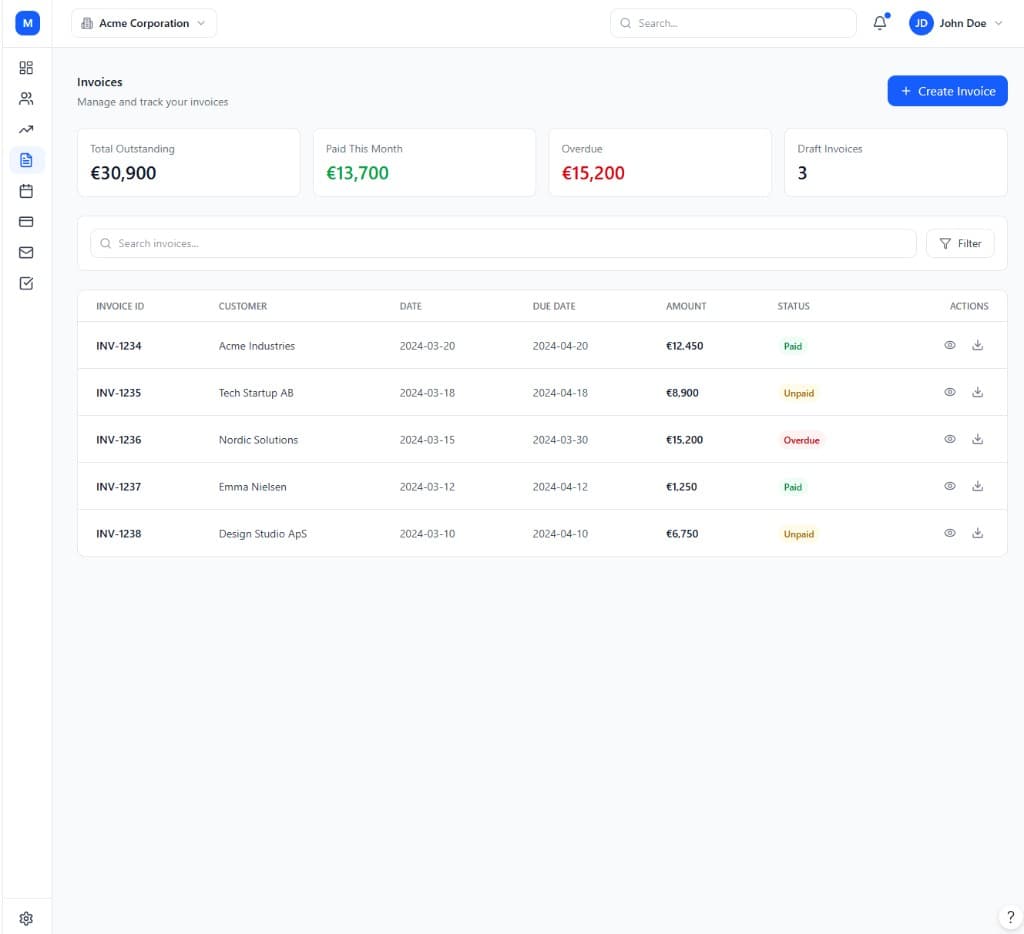
The Invoice module is the first add-on most teams enable once the CRM module is set up, because billing is rarely separate from the relationship you already track in your pipeline. Instead of exporting contacts to a separate accounting tool, you create and send invoices directly from the same customer record — pulling in company details, VAT information, and item catalogs without retyping anything.
Every invoice carries a clear status — sent, viewed, unpaid, overdue, or paid — so you always know where cashflow stands without chasing a spreadsheet. Payment links let customers pay online by card or other supported methods, and automatic reminders follow up on unpaid invoices on a schedule you control, reducing the manual admin of collections for a small team.
As invoicing needs grow more complex — multiple currencies, recurring billing tied to subscriptions, partial payments, or credit notes — the Growth and Enterprise tiers add that depth without forcing you onto a different platform. Enterprise-tier accounts get advanced accounts-receivable reporting, dunning workflows, multi-entity invoicing, and deep ERP integrations for teams that need invoicing to plug into a larger finance stack.
Branding matters even on a routine invoice, so templates carry your logo, colors, and payment terms consistently across every document a customer receives. Because invoices are generated from the same catalog and customer data used elsewhere in ModulCRM, a price change or a new VAT rate only needs to be updated once to apply correctly the next time an invoice goes out.
Teams choose Invoice to bill straight from CRM data, track payment status at a glance, and chase overdue invoices without spreadsheets.
Pull customer and deal data into invoices so you spend less time retyping.
Share payment links and track sent, viewed, unpaid, and paid statuses.
See outstanding, overdue, and paid amounts — then follow up with automatic reminders.
None of this requires enabling any other module first. Invoice is priced and tiered on its own, so a team can adopt it purely for what it does, and connect it to the rest of ModulCRM only when — and if — that becomes useful.
A typical path from setup to day-to-day use of the Invoice module.
01
Start an invoice from an existing contact or company — billing details and history come with it automatically.
02
Use your item or service catalog, apply discounts, and let VAT or tax lines calculate correctly for the customer's region.
03
Deliver the invoice by email with a payment link, then track when it is viewed, paid, or overdue in real time.
04
Automatic payment reminders chase unpaid invoices on a schedule you set, so cashflow does not depend on manual nudges.
Invoice is used differently depending on the size and shape of the team running it, but these are the situations where it comes up most often.
Each module is available in Basic, Growth, and Enterprise — so you pay for depth only where you need it.
Basic covers the core invoice workflow end to end, so a small team can run on it indefinitely without ever touching a higher tier. Growth adds the automation, multi-location, and reporting depth that matters once that workflow starts to strain under more volume or more locations.
Enterprise is aimed at organizations that need invoice to behave like core infrastructure — with governance, advanced integrations, and, in several modules, AI-assisted features layered on top of everything included at Growth.
Basic
Core essentials
Growth
Scale & automate
Enterprise
Governance & depth
Common questions about the Invoice module.
ModulCRM works best when modules share the same contacts and accounts.
Join the waitlist for ModulCRM updates and early pricing.